
AI Automation Services for Businesses
We automate your sales, customer communication, appointment and CRM processes end to end with artificial intelligence. Every incoming request gets answered, recorded and followed up — so you can focus on your work.
What Is AI Automation?
AI automation is when repetitive processes in your business run on their own using artificial intelligence. Understanding an incoming message, asking the right question, saving the information to your CRM, booking an appointment and following up with a customer who hasn't replied — these steps run without human intervention.
The difference from classic automation is how it makes decisions. A rule-based system only reacts to predefined patterns; an AI-driven system understands the content of the request, distinguishes intent and routes the flow accordingly. That is why it holds up against real customer messages written in free form.
What Happens Without Automation?
In most businesses the problem isn't a lack of leads; it's that incoming leads can't be processed.
Requests Go Unanswered
Instagram DMs, WhatsApp messages, web forms... Requests from different channels pile up. By the time you reply, the customer has already messaged a competitor.
Follow-Up Is Scattered
Who asked what, and who replied, isn't recorded anywhere. The knowledge lives in your team's heads and phones; when someone leaves, the process leaves with them.
The Team Drowns in Repetition
Answering the same question dozens of times a day, typing data into spreadsheets by hand, sending reminders — this is where skilled time goes.
What Getflow Builds
We don't sell off-the-shelf software. We study your process, design an automation setup specific to your business and build it on top of your existing infrastructure.
Request Handling Layer
Whatever channel it comes from, every request is answered within seconds, the right question is asked and the lead is qualified.
Data and CRM Layer
The information from the conversation is written automatically to your CRM or list. No customer detail gets lost.
Booking and Routing
A suitable time is proposed, written to the calendar and the relevant team member is notified. Sales-ready leads reach the right person.
Automated Follow-Up
Customers who don't reply or don't show up receive automatic reminders at set intervals. Warm leads don't get forgotten.
Which Processes Get Automated?
Sales
Instant replies to incoming leads, qualification, collecting information for a quote and handing warm leads to the sales team.
Customer Communication
WhatsApp, Instagram DM and phone calls answered 24/7; instant, consistent answers to frequently asked questions.
CRM and Data
Customer records created automatically, split into segments, with conversation history written into the CRM.
Appointments
Asking for a suitable time, writing it to the calendar, sending reminders and re-contacting no-shows.
Operations
Form data pushed into your systems, internal team notifications, and recurring reports compiled and sent automatically.
Follow-Up and Win-Back
Bringing unfinished conversations, unanswered quotes and past customers back into the pipeline in a planned way.
The System Kicks In The Moment a Request Arrives
Whatever channel the customer writes from, the same flow runs — including outside business hours.
Understanding
The incoming message is read by AI; what the customer wants, which product or service they're interested in and how urgent it is are identified.
Reply and Qualification
A suitable reply goes out within seconds, the right question is asked for missing details, and the lead is qualified.
Record and Action
The information is written to the CRM, the appointment lands on the calendar and the relevant team member is notified. The process is logged.
Follow-Up
If no reply comes, automatic reminders kick in. The outcome is reported and the setup is improved accordingly.
We Build On Top Of Your Existing Setup
You don't need to change the tools you use. We connect the automation to the infrastructure you already have.
Messaging Channels
WhatsApp Business, Instagram DM, Facebook Messenger, website chat and phone calls.
- ✦ WhatsApp Business API
- ✦ Instagram & Messenger
- ✦ Voice call infrastructure
CRM and Data
Your existing CRM, your spreadsheets or your own database — we connect to systems that offer API or webhook support.
- ✦ Common CRM systems
- ✦ Google Sheets / Airtable
- ✦ Custom API and webhooks
Calendar, Email, Workflows
The orchestration layer that ties your appointment calendar, email infrastructure and automation flows together.
- ✦ Google Calendar / Outlook
- ✦ Email delivery services
- ✦ n8n / Make automation flows
How Does a Request Move Through the System?
The flow below is the basic skeleton of the systems we build. Names and details are illustrative; the point is to make the mechanism concrete.
Web form, WhatsApp, Instagram DM or phone
Intent, area of interest and urgency identified
Contact, request and source fields filled in
Customer answered, team notified, follow-up scheduled
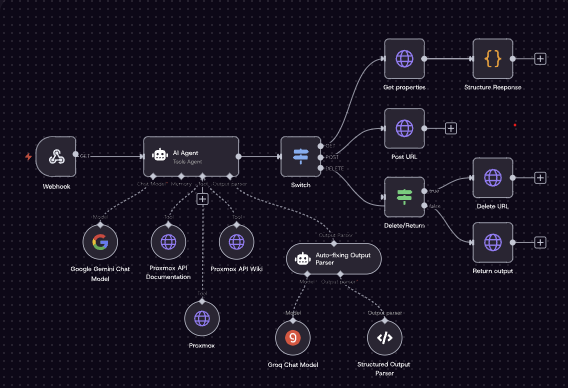
In this example, an AI Agent analyzes the incoming request and decides on its own which API action (fetch, create, delete a record) is needed on the server infrastructure (Proxmox), converts the result into structured output, and self-corrects if it produces a malformed one. This is the common logic behind the systems we build: not fixed rules, but a decision layer that understands content and picks the right action.
Before Automation
- 01 The message waits until someone sees it
- 02 A team member types the reply by hand
- 03 Details are entered into the CRM manually
- 04 Booking takes several messages back and forth
- 05 Follow-up happens only if someone remembers
After Automation
- ✦ The reply goes out within seconds
- ✦ Qualifying questions are asked automatically
- ✦ The CRM record creates itself
- ✦ The appointment lands straight on the calendar
- ✦ Follow-up is scheduled and fires automatically
Four of the five manual steps move to the system side; the human only handles the sales conversation.
Which Businesses Use It?
It suits any business that turns incoming enquiries into sales through conversation. Where it's used most:
Real Estate
Handling buyer and tenant enquiries, matching listings and booking viewing appointments.
Healthcare and Clinics
Answering patient enquiries, managing appointments, sending reminders and following up on no-shows.
E-Commerce
Instant answers to product and shipping questions, post-purchase communication and win-back.
Service Businesses
Lead handling for appointment-driven businesses such as beauty, consulting, education and technical services.
B2B and Agencies
Qualifying incoming leads, scheduling meetings and moving the sales funnel forward automatically.
Automotive and Dealerships
Handling vehicle and pricing questions, test-drive bookings and service reminders.
The Systems We Build
Each one can be set up on its own, and they work together too. Head to the relevant page for details.
AI Sales Automation
A system that replies to leads from your website, Instagram and WhatsApp within 30 seconds, saves them to the CRM and hands them to your sales team.
Explore AI sales automationWhatsApp & Instagram Automation
Messaging automation that answers DMs and WhatsApp messages 24/7, qualifies the customer and routes them to a booking.
Explore WhatsApp and Instagram automation
Voice AI Assistant
A voice AI that answers incoming phone calls like a person, resolves questions, books appointments and calls back missed calls.
Explore the voice AI assistant
CRM & Email Automation
A system that collects customer data automatically, splits it into segments and sends follow-up emails at the right time.
Explore CRM and email automationWeb Form Automation
A system that replies automatically to anyone filling in your site's form, saves their details to the CRM and starts the follow-up process.
Explore web form automation
3D Product Visualization
A catalogue and viewer that let customers rotate your products 360° on your website and try fabric and colour options.
Explore 3D product visualization
AI Chatbot for Real Estate
A real estate solution that answers buyer and tenant enquiries instantly, suggests matching listings and books viewings.
Explore the AI chatbot for real estate
AI Automation for Clinics
A clinic solution that handles patient enquiries, routes them to appointments and follows up automatically on no-shows.
Explore AI automation for clinicsn8n Consulting
Custom automation architecture that connects webhook, API, Google Sheets, CRM and AI systems with n8n, built around your business.
Explore n8n consultingFrom Kickoff To Go-Live
Process Analysis
We map your current flow together: where requests come from, who replies, where you're losing people. This step is free.
Design and Quote
The steps to automate, the channels and the integrations are agreed; a quote is prepared based on scope.
Build and Integration
The system is built, connected to your existing CRM and channels, and the reply scenarios are written in your brand's voice.
Testing and Go-Live
It's tested with real scenarios and goes live once you approve. After that it's monitored and improved.
What Determines the Price?
We don't sell off-the-shelf packages. The setup changes with your needs; the price is determined by:
Number of Channels
Just one channel, or WhatsApp + Instagram + web form + phone all connected together?
Integration Depth
Will it connect to your existing CRM and software, or is a simple list record enough?
Scenario Complexity
The setup grows as appointment calendars, multi-step follow-ups, qualifying questions and reporting are added.
Transaction Volume
Your monthly message, call and request volume directly affects infrastructure and maintenance costs.
How Is Customer Data Protected?
Automation works with customer data, so the setup is designed to be compliant from the very first step.
Data Minimisation
Only the data the process requires is handled. Unnecessary information is neither collected nor stored.
Under Your Control
Data stays in your CRM and your accounts. Access rights are restricted by role.
Disclosure and Consent
The required disclosure text and consent steps are built into the automated message flows.
Retention and Deletion
Retention periods are defined and a working process is set up for deletion requests.
Which Of Your Processes Could Be Automated?
Let's review your business's request flow together and map out — free of charge — where you're losing customers and which steps could be automated.